

Detecting AD Lateral Movement

Learn to detect SMB, PsExec, and RDP lateral movement through Windows Event Logs and Splunk.
medium

To access material, start machines and answer questions login.
In an environment, attackers who compromise a single account rarely stop there. They use built-in protocols like and to move from the initial foothold to servers that hold what they actually want, like domain controllers, file servers, and databases. The tricky part for defenders is that these are the same protocols administrators use every day.
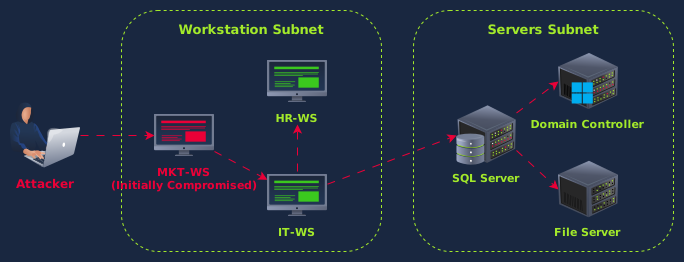
This room covers three lateral movement techniques and the log artifacts they produce. We'll start by looking at normal traffic for each protocol, then investigate a simulated attack that uses SMB, PsExec, and RDP to move from a compromised workstation to the Domain Controller.
Learning Objectives
- Detect AD discovery commands through process creation and Script Block logs
- Identify SMB-based lateral movement through admin share access patterns
- Identify PsExec usage through service installation artifacts, named pipe creation, and correlate source and destination events
- Detect RDP-based lateral movement using and trace multi-hop chains through Logon ID correlation and process artifacts
- Correlate artifacts across source and destination systems to trace an attacker's path
Prerequisites
- Active Directory monitoring: AD architecture, authentication protocols, Windows Event Log structure (Monitoring Active Directory room)
- Initial access detection: How attackers gain their first foothold (Detecting AD Initial Access room)
- Windows Event Logs: Event Viewer navigation, log channels, Event (Windows Event Logs room)
- basics: queries, filtering, stats commands (Splunk: Exploring SPL room)
Start the machine by clicking the Start Lab Machine button below. Give the Splunk instance about 4-5 minutes to launch, then access it using the link below. Feel free to continue reading the next tasks while it boots:

Info: This Splunk instance is used throughout the entire room. The walkthrough tasks (2-6) use index=win. The investigation challenge (Task 7) uses index=challenge, which contains a separate dataset on the same machine. Make sure to set the time range to All Time in Splunk before running your queries.
Set up your virtual environment

I have successfully started my Splunk instance.
Ready to learn Cyber Security?
The Detecting AD Lateral Movement room is only available for Premium or Max subscribers. Signup now to access more than 500 free rooms and learn cyber security through a fun, interactive learning environment.
Already have an account? Log in