
Back to all walkthroughs


Kerberos Delegation Abuse Detection
Investigate Kerberos delegation abuse from Windows disk and memory forensic artifacts.
hard
To access material, start machines and answer questions login.
Delegation abuse does not announce itself. There is no burst of failed logons like the one password spraying leaves behind, no encryption downgrade the way kerberoasting gives itself away; every event in the chain is a well-formed, successful operation, and the only tell is the combination: legitimate events arranged in an order no legitimate process produces. Half the time, the record that would have proven the delegation change was never generated at all, because the auditing that captures it is off by default.
The feature behind delegation solves a real problem. Say a user signs in to an internal web app, and that app has to read their records out of a database on a second server. The web server holds a Kerberos ticket proving the user authenticated to it, but it does not hold the user’s password, so it has nothing to present to the database on their behalf. That is the double-hop problem: the first hop authenticates, and the second hop has nothing left to authenticate with.

Kerberos delegation is Windows’ answer, letting a front-end service, such as a web app, act as the user who called it.
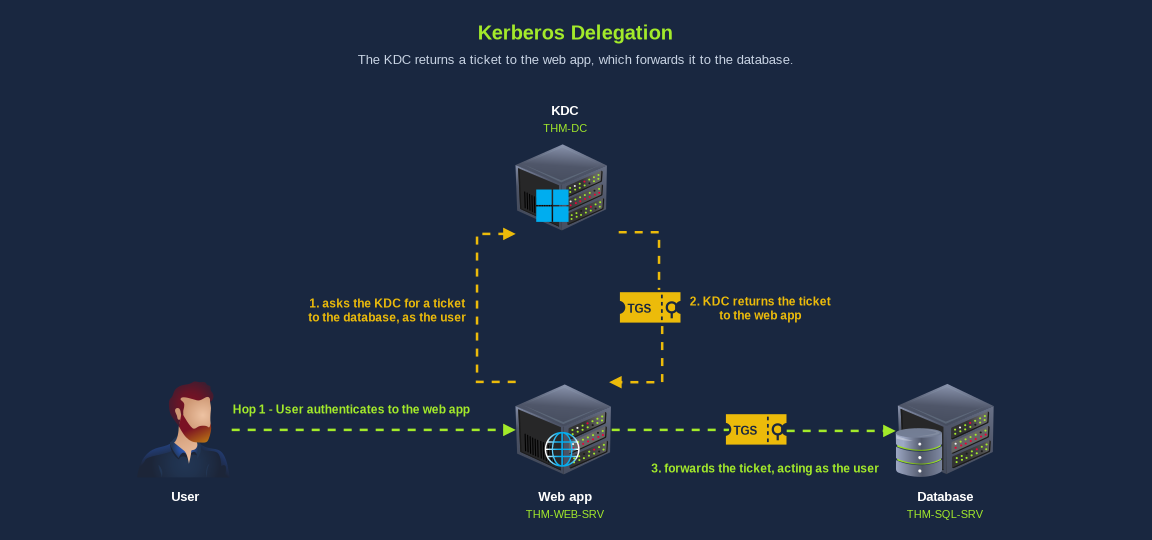
Microsoft has shipped three versions of that answer in twenty years, each one fixing the weakness of the last and each one becoming a target in its own way.
Learning Objectives
By the end of this room, we will be able to:
- Distinguish the three delegation types by their controlling attribute and trust direction.
- Trace an authentication coercion to an unconstrained delegation host.
- Reconstruct delegation activity from memory and disk artifacts.
- Read an S4U2Proxy chain from Event 4769 and explain why the can't record an substitution.
- Sequence evidence-preserving containment for a delegation compromise.
Prerequisites
- Kerberos tickets: How the issues TGTs and service tickets, and what Events 4768 and 4769 record (Kerberos Tickets room)
- Kerberos attacks: Recognizing ticket-based attacks in a domain controller's Security log (Kerberoasting and AS-REP Roasting room)
- Directory replication: What a request looks like and how Event 4662 records it (DCSync room)
- Memory forensics: Running Volatility 3 plugins against a Windows memory image (Volatility room)
- Disk triage: Parsing the
$MFTand event logs with Eric Zimmerman's tools, such as MFTECmd and Timeline Explorer
Machine Access
Set up your virtual environment
To successfully complete this room, you'll need to set up your virtual environment. This involves starting both your DefenseBox and Lab Machines, ensuring you're equipped with the necessary tools and access to tackle the challenges ahead.
Defender machine
Status:Off
Lab machine
Status:Off
Two machines are attached to this room. The IR-Storage machine holds the triage the response team collected, and the DefenseBox is your analysis workstation, with the DFIR toolkit already installed.
DefenseBox Credentials
Use these credentials if you are connecting using RDP
Username
DFIRUser
Password
Secure!
IP address
CONNECTION_IP
IR-Storage Credentials
Use these credentials if you are connecting via RDP or when using the net use command
Username
Administrator
Password
Secure!
IP address
MACHINE_IP
Getting the Evidence
The response team’s collection is on -Storage. The cases sit under C:\Users\Administrator\Desktop\Artifacts\Cases: a pre-incident baseline and one package per delegation type. The investigation sits under C:\Users\Administrator\Desktop\Artifacts\Challenge.
| Location | What it holds |
|---|---|
C:\Users\Administrator\Desktop\Artifacts\Cases\Baseline |
The DC logs from before the intrusion, and the delegation inventories from before and after it |
C:\Users\Administrator\Desktop\Artifacts\Cases\Case1-Unconstrained |
THM-DC and THM-WEB-SRV logs, a memory image, and disk triage |
C:\Users\Administrator\Desktop\Artifacts\Cases\Case2-Constrained |
-DC and THM-SQL-SRV logs and disk triage |
C:\Users\Administrator\Desktop\Artifacts\Cases\Case3-RBCD |
THM-DC and THM-SHR-SRV logs and disk triage |
C:\Users\Administrator\Desktop\Artifacts\Challenge |
The evidence set for Task 6 |

Before you start: The commands in this room assume the evidence is at C:\Cases. If you work with the artifacts somewhere else, adjust the paths to match. Also create an empty C:\Out folder, which Tasks 3 and 4 use for output.
Ready to learn Cyber Security?
The Kerberos Delegation Abuse Detection room is only available for Premium or Max subscribers. Signup now to access more than 500 free rooms and learn cyber security through a fun, interactive learning environment.
Already have an account? Log in